CyberTron was alive.
It booted. Ubuntu Linux ran. Ollama ran. Open WebUI ran. I had taken a $150 AMD FX-era desktop and started turning it into something it was never designed to be: a private local AI server.
There was just one little problem.
It only had 16 GB of RAM.
|
That might have been perfectly respectable when this machine was new, but I wasn’t trying to browse Facebook and check email. I was trying to run local AI models, containers, services, databases, and whatever other questionable ideas I decided to throw at this thing next.
Sixteen gigabytes wasn’t going to cut it.
So I did what any reasonable person building an AI server out of ancient hardware would do.
I went shopping for cheap used DDR3.
When I purchased the machine, it had 16 GB of RAM installed — two 8 GB sticks. So I checked the existing modules: Patriot PSD38G16002 8 GB — PC3-12800 CL11. I popped onto eBay, and lo and behold, there they were: two identical 8 GB sticks, the same type and manufacturer, being sold as a 16 GB package.
Adding those two sticks would bring the machine to 32 GB, maxing out the motherboard’s supported memory capacity.
And so, for $25, I found what looked like the easiest upgrade CyberTron would ever get.
Two additional 8 GB sticks.
16 GB of new RAM, bringing CyberTron to 32 GB total.
|
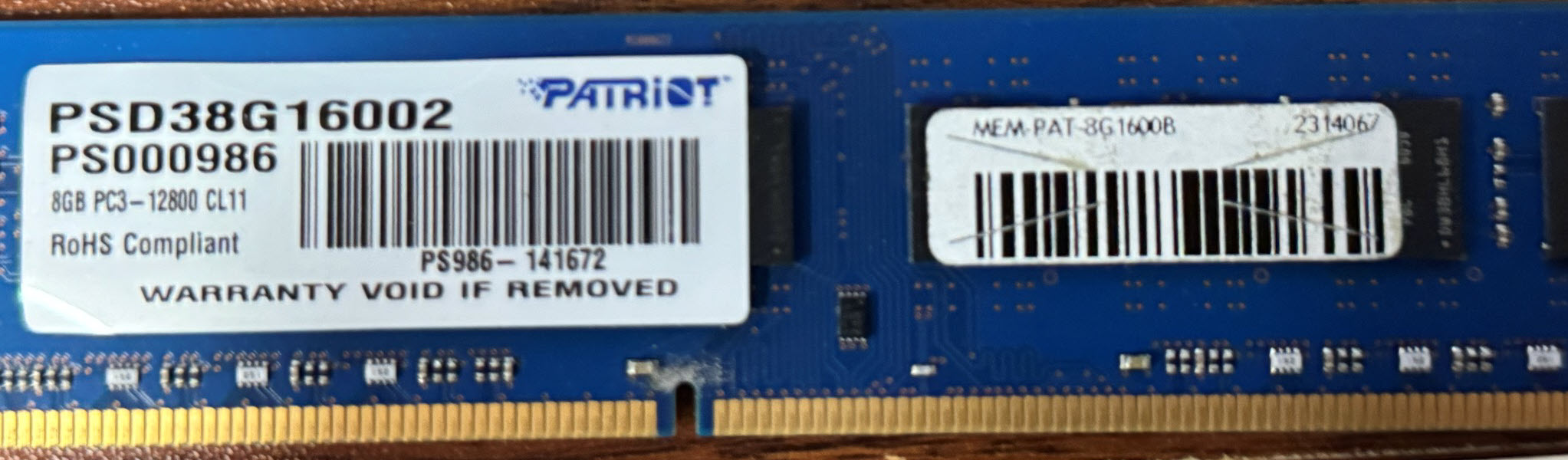
Perfect.
Or so I thought.
This Should Have Taken Ten Minutes (Famous Last Words)
|
RAM upgrades are supposed to be boring.
Shut the machine down.
Pull the old memory.
Install the new sticks.
Turn it back on.
Admire the bigger number. 😂
Done.
I’ve been working with computers and networks long enough that swapping RAM ranks somewhere around plugging in an Ethernet cable on the difficulty scale.
I wasn’t expecting an episode out of this.
I certainly wasn’t expecting a fight.
I installed the two new 8 GB DIMMs, powered CyberTron back up, and checked the memory.
Wait.
What?
I had just installed another 16 GB. It already had 16 GB. I can do math, and that should be 32 GB.
The machine disagreed.
Maybe one of the modules wasn’t seated properly.
No big deal.
Power it down.
Open the case.
Reseat the RAM.
Boot it again.
And that was the moment the $25 RAM upgrade stopped being an upgrade and became a troubleshooting exercise.
Welcome to the Rabbit Hole
|
When memory doesn’t show up correctly, there are only so many suspects.
Bad DIMM.
Bad slot.
Compatibility problem.
Memory timings.
BIOS problem.
Motherboard limitation.
Or some obnoxious combination of several of them.
So I started doing what you do when the obvious answer doesn’t work.
I stopped guessing.
I started testing.
I pulled modules.
Swapped modules.
Changed slots.
Tested different pairs.
Reseated everything.
Booted.
Checked the memory.
Shut it down.
Changed the configuration.
Booted again.
Still 16 GB.
At this point, the RAM itself wasn’t looking like the only suspect anymore.
CyberTron was beginning to remind me of something I learned a long time ago working with old hardware:
Old computers have personalities.
|
Not good personalities.
More like elderly relatives who know exactly what you want them to do and have decided they aren’t doing it.
Four Sticks Enter. Two Sticks Apparently Leave.
|
The strange part was that the system worked.
It wasn’t throwing obvious memory errors.
It wasn’t refusing to boot.
It wasn’t giving me the satisfaction of a catastrophic failure that would at least point directly at the problem.
It just kept quietly telling me:
16 GB.
That is actually worse.
A dead machine gives you somewhere to start.
A machine that boots normally while ignoring half the hardware you just installed makes you question everything.
Were the sticks compatible with one another? They should have been. They were the exact same model and chipset, although the PCB on the original pair was blue while the PCB on the new pair was green.
Was the motherboard actually supporting the configuration the way I expected?
Was there some weird limitation buried in the BIOS?
Was one memory channel acting up?
Was this old board just being an asshole?
All reasonable possibilities.
And because this machine had already been around for a very long time before I bought it, there was another variable hanging over the entire project:
I had no idea what had been done to it during its previous life.
That is part of the deal when you buy old hardware.
You aren’t just buying a computer.
You are inheriting somebody else’s history.
Then I Started Looking at the BIOS
|
Once swapping memory around stopped producing useful answers, I went deeper.
BIOS settings.
Memory configuration.
Timings.
Firmware.
Anything that might explain why a machine with four 8 GB modules installed was stubbornly reporting half of them.
Eventually, I arrived at one of those decisions that always makes an otherwise simple hardware upgrade more interesting:
Maybe the BIOS needs to be updated.
|
Flashing the BIOS isn’t inherently difficult.
But unlike moving RAM sticks around, a bad BIOS flash has the potential to turn an annoying computer into a very large paperweight.
That makes the stakes slightly different.
Still, CyberTron was running old hardware, and eliminating outdated firmware as a variable made sense.
So I flashed the BIOS.
The update completed.
The machine rebooted.
Everything came back.
Good.
I checked the memory.
Of course.
Because apparently CyberTron had decided that if I was going to get 32 GB of RAM, I was going to earn it.
At this point, I had already done the sensible troubleshooting.
Now came the part familiar to anyone who has spent enough time repairing computers:
Doing variations of things you have already done because somewhere in the combination of hardware, seating, slots, and timing is an answer you haven’t found yet.
So I went back to the memory.
Modules came back out.
Slots were checked again.
Sticks were rearranged.
Everything was reseated.
Again.
Then I powered CyberTron back up.
The machine POSTed.
I entered the BIOS.
And there it was.
Thirty-two gigabytes.
All four sticks.
Finally.
The exact same upgrade that should have taken a few minutes had turned into an entire troubleshooting session involving DIMM testing, slot combinations, BIOS investigation, a firmware update, and enough rebooting to make me wonder whether the original 16 GB had really been such a terrible problem after all.
But it worked.
And more importantly, I hadn’t spent another dollar fixing it.
The final cost of the memory upgrade was still exactly what I started with:
The financial cost was cheap.
The aggravation was complimentary.
Why 32 GB Actually Matters
|
It would be easy to look at this as nothing more than an old computer being difficult.
But the RAM upgrade mattered because CyberTron was already moving beyond being just another Linux box.
The goal of this project wasn’t simply to prove that an old desktop could boot an AI model.
That part was already done.
The goal was to see how far I could push inexpensive hardware toward becoming a genuinely useful private AI platform.
That means running the model isn’t the whole workload.
There is the operating system.
Open WebUI.
Ollama.
Containers.
Databases.
Search.
Automation.
Knowledge bases.
Monitoring.
And eventually, services I probably haven’t even thought of yet.
VRAM may determine how much of an AI model can live on the GPU, but system RAM still matters everywhere else.
Sixteen gigabytes gave me enough room to start experimenting.
Thirty-two gave CyberTron room to grow.
And that is really what this build is becoming.
Not one giant upgrade.
Not one magic component.
Just a series of bottlenecks.
Find one.
Fix it.
Push the machine harder.
Find the next one.
There was also something satisfying about the math.
CyberTron started as a $150 computer.
I had now thrown another $25 at it.
So for $175, I had an old AMD FX machine running Linux, local AI, and now 32 GB of RAM.
Was it fast?
Not particularly.
Was it modern?
Absolutely not.
Was I having way too much fun finding out what it could do?
Definitely.
And the more I worked with it, the more obvious something else became.
Memory wasn’t going to be CyberTron’s biggest limitation for long.
Because sitting inside this supposedly AI-capable machine was a GTX 1060 with 6 GB of VRAM.
Six gigabytes.
Now that was going to become a problem.
And unlike the RAM upgrade, I wasn’t going to solve this one for twenty-five bucks.
Next: Why I Bought an RTX 3060 in 2026
|
Buying an RTX 3060 in 2026 doesn’t exactly sound like cutting-edge AI infrastructure.
But CyberTron isn’t a cutting-edge computer.
It’s a $150 experiment that keeps refusing to stay small.
And when I started looking at what 6 GB of VRAM was doing to my local AI plans, I had a decision to make.
Buy newer.
Buy bigger.
Or find the sweet spot between cheap, old, and still useful.
Naturally, I went with the third option.