|
A Roger’s Rabbit Hole White Paper · The AI Workbench
|
Why LLM model size doesn’t equal knowledge, and why a specialized model rack can outperform one giant AI model
By Roggie D | November 2026 | The AI Workbench
| |
WHO THIS IS FOR
Written for local AI tinkerers, homelab operators, IT professionals, AI engineers and anybody deploying private AI systems who is tired of being told the biggest model always wins.
|
There’s a belief floating around the AI world that the biggest model is automatically the smartest one in the room. More parameters, more gigabytes, more brains. It’s a nice, simple story. It’s also wrong.
More parameters can give a model more room to learn, and bigger models often do score better. But parameter count by itself doesn’t tell you what a model actually knows, how well it reasons, whether it’s any good at your particular job, or whether it will run on the hardware sitting under your desk.
If you run AI locally, that difference isn’t academic. A 350 GB model might need a mountain of memory and bandwidth to answer a question that a smaller, well-chosen model could answer faster and just as accurately, sometimes more accurately. The alternative I keep coming back to is a model rack: a coordinated set of specialized models, knowledge sources, tools and inference services, with something sensible out front deciding which job goes where.
| |
How good an AI system is depends on model quality, the knowledge it can reach, the tools it can use and how the whole thing is put together. Not on how many gigabytes you managed to cram into memory.
|
Let me be clear about what this paper isn’t. It’s not a claim that small models always beat big ones. They don’t. It’s an argument for sizing and picking models based on the work you actually measure, and for treating model size as one engineering variable among many instead of the whole ballgame.
A quick word on numbers. Most of the comparisons in here are illustrations, and I label them that way. Where I have real numbers from my own CyberTron bench, I put them in a “From my bench” box so you can tell the difference between a thought experiment and something I actually ran.
1. What model size actually represents
|
1.1 Parameters are not individual facts
A large language model is a neural network full of learned numbers called parameters, or weights. Training nudges those numbers until the network can model the relationships between tokens, concepts and patterns. A 7B model has roughly 7 billion of them. A 70B model has about 10 times as many. That does not mean it knows 10 times as many correct facts.
Knowledge lives in patterns spread across the weights. One parameter is not one fact. More parameters raise the ceiling on what a model could learn, but what it actually learns depends on the training data, the training objective, how much compute went in and what happened in post-training. Think of a library. More shelves give you more potential capacity. They don’t prove the books are accurate, current, relevant or even on the shelf.
|
10× parameters ≠ 10× knowledge
|
1.2 Parameters and disk footprint are different measurements
People toss around parameter count, file size and memory like they’re the same number. They aren’t, and mixing them up is how folks end up buying the wrong hardware.
Table 1. Five numbers people mix up.
| Measurement |
Meaning |
| Parameter count |
Number of learned numerical values in the neural network |
| Model file size |
Storage taken up by the serialized weights, possibly quantized |
| Resident memory |
RAM or VRAM plus the runtime buffers needed for inference |
| Context length |
Supported input plus generation token capacity |
| Active parameters |
The subset of parameters used for each token, especially in MoE models |
For a dense model, here’s a handy rule of thumb:
|
Weight memory ≈ (parameter count × bits per parameter) ÷ 8
|
For a 70B model, that works out like this:
Table 2. Raw weight storage for a 70B dense model at different precisions.
| Weight representation |
Theoretical raw weight storage |
| FP16 (16-bit) |
140 GB |
| INT8 (8-bit) |
70 GB |
| 4-bit |
35 GB |
Those are decimal gigabyte estimates for the raw weights, not the exact memory you’ll need to run the thing. Quantization metadata, mixed-precision tensors, the KV cache, scratch buffers and implementation details all pile on top. And a file advertised as 350 GB tells you nothing on its own about the architecture, the parameter count, what it costs to run per token or whether its answers are any good.
2. Why more parameters don’t guarantee more knowledge
|
2.1 Training data and compute allocation matter
Picture a hypothetical 100B model trained on a pile of poorly curated junk, sitting next to a 30B model trained on much better data. On plenty of tasks, the smaller one could win. The capacity to learn and what training actually put in there are two different things.
This isn’t just theory. The Chinchilla research from DeepMind found that the big models of the day were significantly undertrained. Their 70B Chinchilla model used the same compute budget as their 280B Gopher model but trained on about four times as much data, and it outperformed Gopher, GPT-3 (175B), Jurassic-1 (178B) and Megatron-Turing NLG (530B) across a wide range of evaluations [1]. The balance between parameters and training tokens mattered more than raw size.
2.2 Quality and specialization can beat size
Microsoft’s Phi-3 technical report described phi-3-mini, a 3.8B model trained on 3.3 trillion tokens of heavily filtered web data and synthetic data. On the benchmarks the authors report, it rivals much larger models such as Mixtral 8x7B and GPT-3.5, including 69% on MMLU [2]. That’s a benchmark result, not proof that small models always win. The lesson for anybody running models at home: check whether a model was trained and tuned for your kind of work before you pick it by parameter count.
2.3 Tools can matter more than a bigger network
A big generalist can give you a very convincing explanation of a software bug. A smaller code model hooked up to the actual repository, the docs, the tests and the compiler can help you produce a fix you can verify. One gives you a plausible answer. The other gives you a validated result. I’ll take the second one every time. A useful system combines learned skill with evidence and checks it can actually run.
3. Knowledge, reasoning and operational capability are three different things
|
3.1 Knowledge
Knowledge is information a model can correctly recall or go get: networking standards, language syntax, historical facts. Seeing a fact during training doesn’t guarantee the model will pull it back out correctly.
3.2 Reasoning
Reasoning is the ability to combine what’s available, infer relationships and work through new or multistep problems. A model stuffed with facts can be a lousy reasoner. A strong reasoner can be missing the facts it needs.
3.3 Operational capability
A practical AI system can read authorized service logs, pull current configuration, compare measurements, run permitted tests and check its own hypotheses. Those abilities come from the architecture around the model, not from extra parameters. A model that learned everything there is to know about DNS and routing still can’t know what your private network looks like today. Nobody told it.
4. Where one giant general-purpose model falls short
|
4.1 Every task pays big-model prices
Converting a date, summarizing a log, writing code, diagnosing an incident and designing a distributed system are not equal amounts of work. Running all five through a giant model is like provisioning your biggest VM for every application on the network, whether it needs the horsepower or not. Anybody who has ever had to explain an overprovisioned server bill knows how that conversation goes.
| |
FROM MY BENCH
SAME MODEL, 57 TIMES SLOWER
On my CyberTron box I ran a 9B model through a seven-question reasoning test twice, once with its “thinking” mode off and once with it on. Both runs scored 7 out of 7. Thinking off averaged 0.361 seconds per answer. Thinking on averaged 20.465 seconds. That’s about 57 times slower for exactly the same score. Seven questions is a small test, not a law of nature, and harder problems may well need the thinking. But it makes the point: running heavyweight inference on lightweight work costs real time.
|
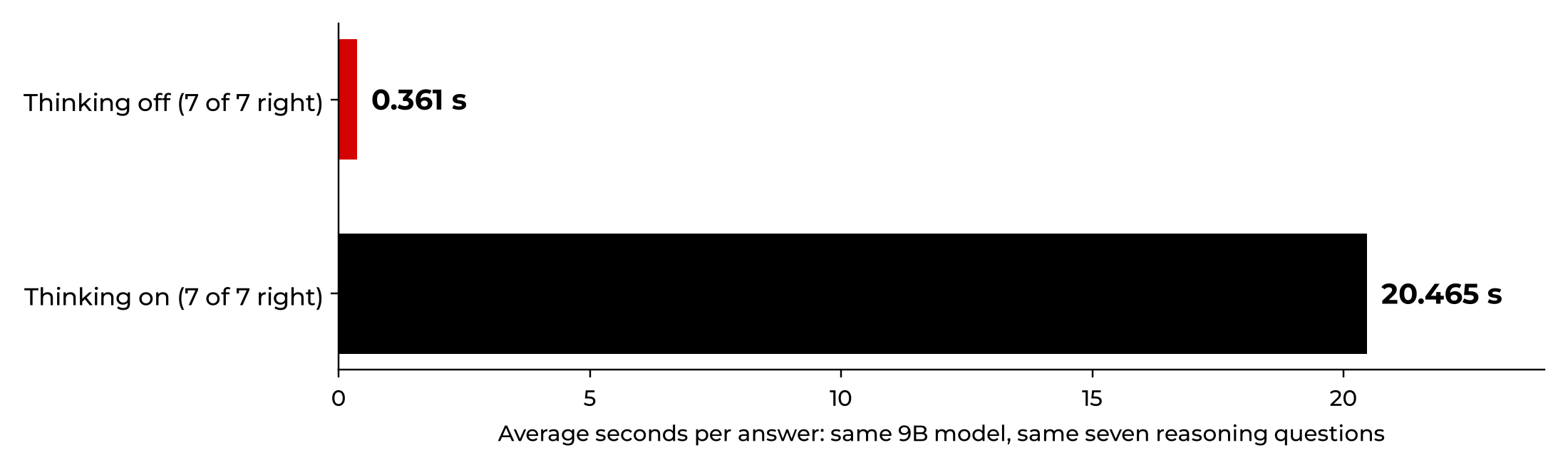
Figure 1. From my bench: one 9B model, thinking off vs. thinking on, same seven reasoning questions. Both scored 7 of 7.
4.2 Weight movement and memory bandwidth
For a lot of local setups, especially single-user, small-batch inference, generating each token means reading the model’s weights through the memory system, and that’s often the bottleneck. A rough bandwidth-only ceiling looks like this:
|
Maximum output tokens per second ≈ effective memory bandwidth ÷ weight bytes read per token
|
Example: if 350 GB of weights effectively had to stream for every token over a memory system delivering 100 GB/s, the bandwidth-only ceiling is about 0.29 tokens per second. That is NOT a prediction for any particular hardware. Caching, batching, architecture, offloading and real access patterns all change the answer. For mixture-of-experts models, the bytes read per token track the active experts rather than the whole file (more on that in Section 9). The point stands: bigger weights mean more data to move, and moving data takes time.
4.3 CPU offloading is not free GPU memory
Pushing layers into system RAM lets an oversized model load. It can also make it crawl, thanks to lower memory bandwidth, CPU compute and PCIe transfer costs. “It fits” and “it runs at a usable speed” are two very different outcomes.
| |
FROM MY BENCH
THE 35B MODEL THAT WOULDN’T DO 50
In October a post was making the rounds claiming a 35B mixture-of-experts model ran at about 50 tokens per second on an RTX 3060 with 12 GB of video memory. That’s my card. I paid $285.04 for it. So I built llama.cpp and tried it, with part of the model offloaded to system memory. My first standardized benchmark came in at 5.56 tokens per second. After tuning, the best I got was 11.75. I couldn’t reproduce the claim on my hardware, and the post didn’t come with a reproducible benchmark. My best guess is that the work pushed off to the CPU side is what held it back. Either way, that model earned a slot for hard questions, not the everyday job.
|
4.4 Context size is not durable knowledge
A longer context window lets you send bigger prompts. It doesn’t change the model’s weights, so nothing sticks once the conversation ends. The Lost in the Middle study found that models often do best when the relevant information sits at the beginning or end of a long context and noticeably worse when it’s buried in the middle, even models built for long contexts [4]. Good retrieval usually beats shoveling every document you own into one enormous prompt.
4.5 Big models still hallucinate
A large model can confidently hand you wrong facts, outdated commands or explanations nothing supports. Bigger doesn’t cure that. Retrieval with sources you can trace, deterministic validation and controlled tool use go after failure modes that adding parameters can’t fix.
5. The model rack: an architecture that pays attention to the work
|
A model rack is a logical set of inference models, services, tools and knowledge sources behind one shared gateway. It doesn’t have to be a physical server rack, although I’ll admit I like the mental picture. Requests get classified and routed to the right specialist, with escalation for the jobs that genuinely need more reasoning horsepower.
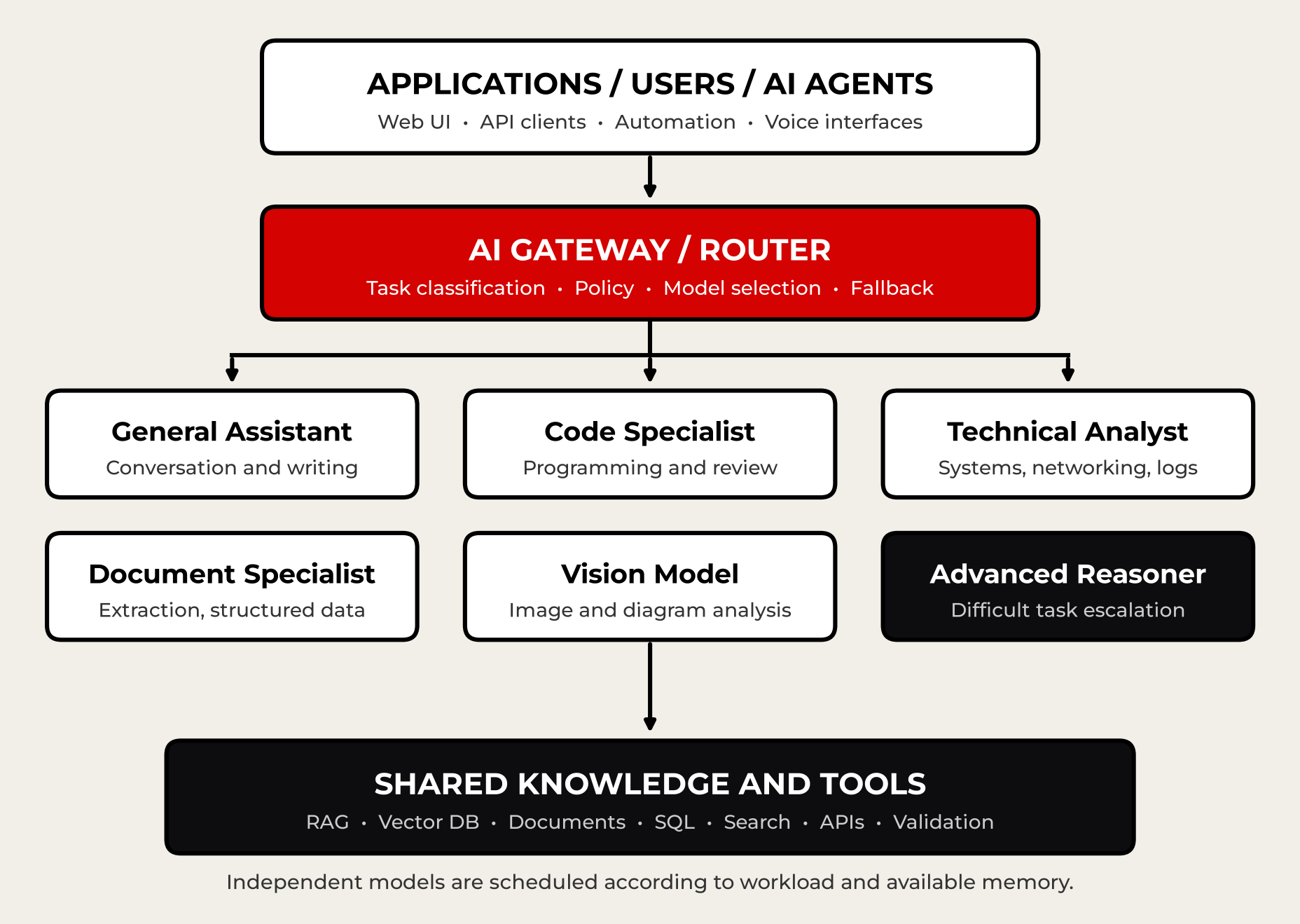
Figure 2. A conceptual local model rack. Independent models are scheduled according to workload and available memory.
5.1 Specialized services are normal engineering
IT has split routers, firewalls, databases, DNS and application servers onto separate jobs for decades. AI services can be broken up the same way. A powerful firewall isn’t automatically a good database server, and a big general model isn’t automatically your best coding, vision, extraction or retrieval component.
Table 3. Example rack roles. Sizes are illustrative only.
| Model role |
Typical workload |
Illustrative scale |
| Lightweight assistant |
Routing, classification, simple queries |
1B to 4B |
| General assistant |
Conversation, writing, summarization |
7B to 14B |
| Code specialist |
Development, debugging, review |
7B to 32B |
| Technical analyst |
Logs, networking, structured analysis |
8B to 32B |
| Vision-language |
Images and multimodal tasks |
3B to 12B |
| Advanced reasoner |
Difficult tasks and escalation |
30B to 70B+ |
| Embedding model |
Document indexing and semantic retrieval |
Often much smaller |
These are illustrative bands, not minimums and not performance guarantees. Picking real models takes benchmarks, context tests and actual memory measurements.
5.2 Routing and validation are the intelligence layer
Here’s the path a request should take, using a service log analysis as the example:
- Receive the log analysis request.
- Classify the workload, risk, access level and resource requirements.
- Retrieve the authorized logs or current system evidence.
- Run the selected technical model.
- Validate required fields, source support and anything a machine can check.
- Retry or escalate when validation fails or the task goes beyond what the model has proved it can do.
A folder full of downloaded models is not a model rack. The capability comes from controlled selection, evidence, tools, scheduling and fallback behavior you can measure.
| |
FROM MY BENCH
MY RACK MOSTLY PICKED ONE MODEL
I built a benchmark and router agent to answer the question I typed the day I started it: “Which of these damn models is actually useful?” Its rule is simple: quality first, then speed, then memory. When its first full report came back, five of six job types went to the same 9B model with thinking off. That’s not a failure of the idea. A rack isn’t a pile of models. It’s the habit of measuring each job and sending it to the cheapest thing that gets it right. Sometimes the answer is boring. Boring and fast beats impressive and slow.
|
5.3 A model rack doesn’t mean every model stays loaded
On a 12 GB GPU, you’re not keeping several substantial models resident at once. A practical rack might keep one lightweight model loaded, run a shared inference service and park the rest on SSD to load when needed. Swaps cost time, so measure residency and switching costs. The goal is useful work per unit of hardware, not bragging rights for the most models installed.
| |
FROM MY BENCH
WHAT A SWAP COSTS
With my 9B model loaded, the card peaked at 8,791 MiB in use out of 11,909 MiB, so there was no room for a second model that size next to it. Loading it cold took 7.49 seconds before it did any work at all. For reference, Ollama’s documentation says it keeps a model in memory for five minutes by default, and on a GPU a new model has to fit completely in video memory to load alongside another one. Otherwise requests wait while idle models get unloaded [10]. Bounce between slots and you’ll feel every swap.
|
6. One 350 GB model vs. a smaller model rack
|
Take two setups. Architecture A is one general-purpose 350 GB model. Architecture B is several specialized models whose files add up to about 70 GB, plus routing and shared retrieval tools. These are hypothetical storage numbers, not benchmark results.
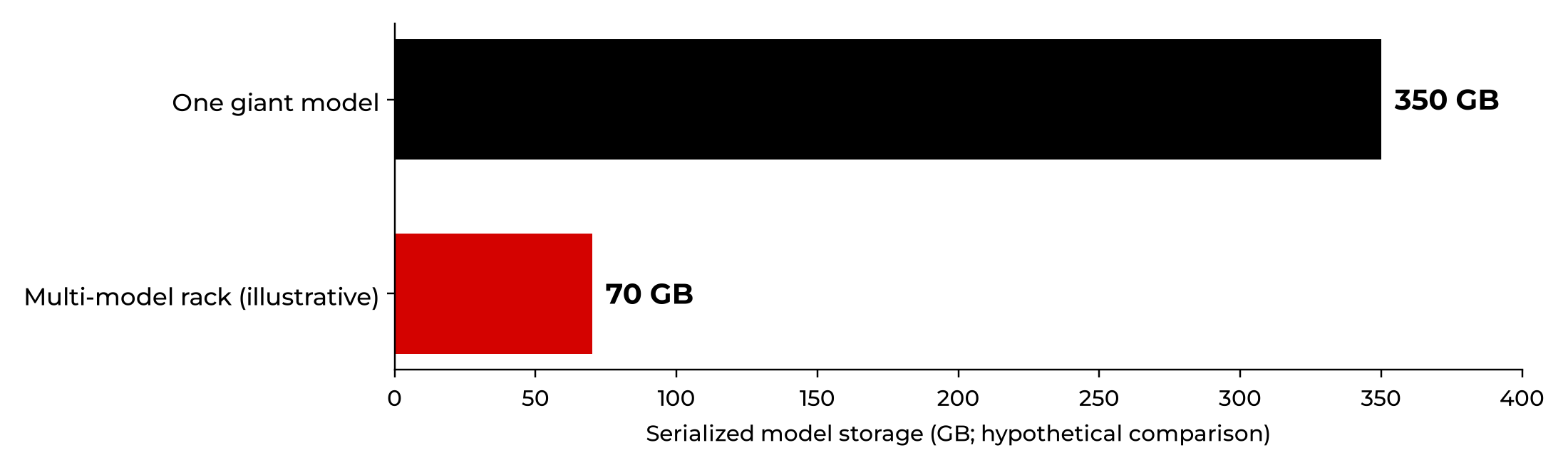
Figure 3. Hypothetical storage footprints. This is not an inference speed or accuracy benchmark.
Table 4. The monolith and the rack, side by side.
| Criterion |
350 GB monolith |
Specialized model rack |
| Disk footprint |
Single large artifact |
Multiple smaller artifacts |
| Runtime memory |
Potentially very high |
Footprint of whichever models are loaded |
| Simple requests |
Large-model inference |
Lightweight path available |
| Complex reasoning |
May be excellent |
May require escalation |
| Current private facts |
Needs retrieval or tools |
Uses shared retrieval and tools |
| Failure isolation |
One primary inference dependency |
Independent services possible |
| Model lifecycle |
One major model update path |
Independent model updates |
| Concurrency |
Depends on infrastructure |
Can be distributed, given resources |
| Operations |
Simpler routing, harder sizing |
More orchestration and scheduling |
| Quality |
Benchmark required |
Benchmark required |
The rack isn’t automatically faster. Several models fighting over one GPU can do worse than one sensible model. A powerful giant model on enough GPUs with high-bandwidth memory can dominate the hard stuff. The rack makes sense when most of your requests can be handled accurately by cheaper specialists.
6.1 Calculate cost per accepted result
|
Cost per useful result = (infrastructure + energy + operating costs) ÷ accepted task outcomes
|
Tokens per second are useful, but a fast wrong answer is not a bargain. An expensive model can still be worth every penny if it prevents expensive failures or rework. Compare accepted outcomes, and count the effort it takes to verify them.
7. Retrieval-augmented generation moves knowledge outside the weights
|
Retrieval-augmented generation, or RAG, pulls supporting material from a separate source and hands the relevant passages to the model while it’s answering. The original research combined knowledge stored in a model’s parameters with an external retrieval index and set the state of the art on three open-domain question answering tasks at the time [3].
A giant model may know routing, firewalls and Docker cold. It still can’t know the current configuration of your own network unless somebody feeds it that data. A smaller model connected to authorized, current inventory and change logs may give you a more factual operational answer. That works because the right evidence is in front of it, not because the small model is a better general reasoner.
Unlike continued pretraining or fine-tuning, indexing documents can make new information available without touching the model’s weights. But retrieval breaks too: stale documents, bad chunking, broken access controls or a model that misreads what it got. RAG needs its own evaluation, for both retrieval and answer quality.
| |
Ask, “What changed in our Docker environment yesterday?” A 300B model without recent logs can’t reliably know. A 9B model with the right change record can answer precisely.
|
8. Quantization changes the economics
|
Quantization stores weights at lower numerical precision. Going from FP16 to roughly 4 bits per weight cuts raw weight memory, and the bandwidth needed to read it, by up to about three quarters (see Table 2). QLoRA showed how far 4-bit techniques can stretch: the authors fine-tuned a 65B model on a single 48 GB GPU while preserving full 16-bit fine-tuning task performance [5].
Quantization doesn’t add knowledge. It can keep much of a model’s quality, but how much depends on the architecture, the quantization scheme and the task, and sensitive work such as coding and math can take a bigger hit. Neither file size nor parameter count picks the winner without testing on your own workload.
9. Dense vs. mixture-of-experts models
|
A dense transformer runs every token through all of its parameters. A mixture-of-experts (MoE) model contains multiple expert subnetworks and a learned router that activates only a few of them for each token. That sparse activation lets a model carry a huge total parameter count without a matching increase in compute per token [6].
Here’s the catch nobody prints on the box: compute scales with active parameters, but memory scales with total parameters. All those experts still have to live somewhere, and Hugging Face’s MoE explainer notes these models need high VRAM because all experts are loaded in memory [11]. That’s a big part of why I think the 35B model in Section 4.3 ran the way it did on my card: only about 3 billion parameters active per token, but more weights than 12 GB of video memory can hold.
So compare total parameters, active parameters, expert routing, where the weights live and observed throughput. And don’t confuse an MoE with a model rack. An MoE routes tokens inside one trained network. A rack routes requests and workflow steps among separate models and tools that you pick and test yourself.
10. Measure local AI performance honestly
|
The serving stack matters too. The vLLM PagedAttention paper showed that smarter KV cache memory management improved throughput two to four times over the systems it was compared with, at the same latency, under the configurations studied [7]. The same base model can behave very differently across runtimes, batching policies, cache implementations, GPUs and context sizes.
Table 5. What to measure, and what it tells you.
| Metric |
What it reveals |
| Time to first token |
Responsiveness before generation starts |
| Output tokens per second |
Decoding rate |
| End-to-end latency |
How long the user actually waits for the finished task |
| Peak RAM and VRAM |
Capacity under realistic load |
| Model load time |
The cost of switching specialists |
| Task success rate |
Validated result quality |
| Energy per accepted task |
Useful-work efficiency |
| Concurrent throughput |
Multiuser service capacity |
| Retrieval quality |
Whether authoritative evidence was found |
Hypothetical workload: 55 routine queries, 20 coding tasks, 15 document tasks and 10 hard reasoning tasks a day. The rack routes each one by demand. The monolith runs all 100 through the big model. Compare actual latency, acceptance, power draw and routing overhead before you decide which one wins.
11. A hybrid design is often the strongest approach
|
A sensible local AI platform combines a lightweight default assistant, specialist coding and vision models, an embedding and retrieval layer, deterministic tools and a larger reasoning model for escalation. It’s the same idea as scheduling demanding services onto the right compute instead of making every job eat peak resources.
Escalation has to run on checks, not on a model announcing that it feels confident. Prefer schema tests, retrieved citations, compiler output, unit tests and validators built for the workload. And you don’t need a full meeting of agents for every question. Multi-agent orchestration can add latency and errors of its own. Use it when the complexity actually justifies the coordination.
12. A practical deployment sequence for homelabs
|
If you want to try this at home, don’t start by downloading 20 models. Start here:
STEP 1 BASELINE
Pick one capable model that fits your actual hardware. Measure typical task quality and speed.
STEP 2 FIND THE FAILURE PATTERNS
Look for recurring weak spots in coding, reasoning, extraction, multimodal work or technical analysis.
STEP 3 ADD SPECIALISTS
Install only models that fix a weakness you measured. Log the model version, quantization, context, memory and evaluation results.
STEP 4 ADD SHARED KNOWLEDGE
Index your documents and enable approved tools, with provenance, access restrictions and validation.
STEP 5 INTRODUCE ROUTING
Send routine tasks to the affordable models and escalate failures or unusually demanding requests.
STEP 6 OPTIMIZE RESIDENCY
Measure SSD load times, switching frequency, context caches, contention and concurrency. Keep only the high-value models resident.
13. Prove it with reproducible benchmarking
|
Build a set of representative, held-out tasks: factual Q&A, hard reasoning, code changes with executable tests, document extraction, diagnostics with known outcomes, retrieval questions, cases where the right answer is “I don’t know” and concurrent requests. Record versions, prompts, quantization, sampling settings, runtime, context, hardware, retrieval and tool permissions.
Evaluate the standalone model separately from the complete system. To isolate the effect of model selection, give both architectures the same authorized data and tools. Repeat the tests, report the variability and track errors by severity. HELM made the case for evaluating several dimensions, such as accuracy, calibration, robustness and efficiency, instead of trusting a single score [8].
The rack succeeds only if it clears your quality thresholds and materially improves cost, responsiveness, service continuity or workload coverage. If it doesn’t, simplify it. The research points the same way. In the FrugalGPT experiments, a cascade of models matched the best individual model, GPT-4, with up to 98% lower cost [9]. RouteLLM’s trained routers cut costs by more than two times in some cases without hurting quality on public benchmarks [12]. Those are their benchmarks, not mine, but it’s the same idea I ended up testing on a much smaller scale.
14. When a giant model is the right tool
|
I’m not anti-big-model. Large models have real advantages on broad, unfamiliar work, deep multistep reasoning, complex code analysis, advanced language tasks and jobs where routing would only add complexity. They may be the right escalation tier, or even the primary model, when the hardware is there and the measurements back it up.
| |
The engineering mistake isn’t deploying a large model. It’s assuming size guarantees superiority for every request.
|
15. Build an AI system, not a parameter collection
|
The questions that matter: Does the system solve real tasks accurately? Does it use current, authoritative information? Does it verify its results? Does it fit the hardware you actually have? Can it adapt when better models show up next month, which they will?
A 350 GB model may be impressive and exceptionally capable. But size alone doesn’t make it the best choice for everything. A coordinated model rack can route simple work to efficient models, put specialists on the hard domains, ground answers in retrieved evidence, verify outputs with tools and save the heavyweight inference for the jobs that actually benefit from it.
| |
A large model is an asset. A well-engineered model rack is an architecture.
|
| |
The goal isn’t the biggest brain that fits. It’s the right intelligence, with the right knowledge and tools, doing the right job at the right time.
|
Measure first. Then download, buy or build. In that order.
[1] Jordan Hoffmann et al., “Training Compute-Optimal Large Language Models,” arXiv:2203.15556, 2022. https://arxiv.org/abs/2203.15556
[2] Marah Abdin et al., Microsoft, “Phi-3 Technical Report: A Highly Capable Language Model Locally on Your Phone,” arXiv:2404.14219, 2024. https://arxiv.org/abs/2404.14219
[3] Patrick Lewis et al., “Retrieval-Augmented Generation for Knowledge-Intensive NLP Tasks,” NeurIPS 2020, arXiv:2005.11401. https://arxiv.org/abs/2005.11401
[4] Nelson F. Liu et al., “Lost in the Middle: How Language Models Use Long Contexts,” Transactions of the Association for Computational Linguistics, 2024. https://aclanthology.org/2024.tacl-1.9/
[5] Tim Dettmers et al., “QLoRA: Efficient Finetuning of Quantized LLMs,” arXiv:2305.14314, 2023. https://arxiv.org/abs/2305.14314
[6] William Fedus, Barret Zoph and Noam Shazeer, “Switch Transformers: Scaling to Trillion Parameter Models with Simple and Efficient Sparsity,” Journal of Machine Learning Research 23, 2022. https://jmlr.org/papers/volume23/21-0998/21-0998.pdf
[7] Woosuk Kwon et al., “Efficient Memory Management for Large Language Model Serving with PagedAttention,” SOSP 2023. https://doi.org/10.1145/3600006.3613165
[8] Percy Liang et al., “Holistic Evaluation of Language Models,” Transactions on Machine Learning Research, 2023, arXiv:2211.09110. https://arxiv.org/abs/2211.09110
[9] Lingjiao Chen, Matei Zaharia and James Zou, “FrugalGPT: How to Use Large Language Models While Reducing Cost and Improving Performance,” arXiv:2305.05176, 2023. https://arxiv.org/abs/2305.05176
[10] Ollama, FAQ (keeping models loaded and handling concurrent requests). https://docs.ollama.com/faq
[11] Hugging Face, “Mixture of Experts Explained.” https://huggingface.co/blog/moe
[12] Isaac Ong et al., “RouteLLM: Learning to Route LLMs with Preference Data,” arXiv:2406.18665, 2024. https://arxiv.org/abs/2406.18665
|
How to read the numbers: the comparisons and workload examples in this paper are illustrations, not results from a controlled benchmark. The exceptions are the “From my bench” figures, which come from my own runs on Oct. 4 and Oct. 16, 2026, on an RTX 3060 with 12 GB of video memory. Those are small tests on one machine, and I treat them that way. Outside figures (Chinchilla, Phi-3, vLLM, FrugalGPT, RouteLLM) are those researchers’ results on their benchmarks, not mine. No study cited here proves that model racks or giant models are always the better choice.
|
ABOUT THE AUTHOR
|
|
Roggie D has been messing with computers since the early 1980s and working in IT since the mid-1990s, from network engineering to the CEO’s chair. These days he’s retired, which mostly means he gets to pick which problems are worth solving. He writes Roger’s Rabbit Hole, where CyberTron, his budget local AI build, keeps sending him down new ones.
More from the Rabbit Hole at rogersrabbithole.com.
|