| A Roger’s Rabbit Hole White Paper |
How a $150 legacy PC became a functional local AI server
By Roggie D | November 2026
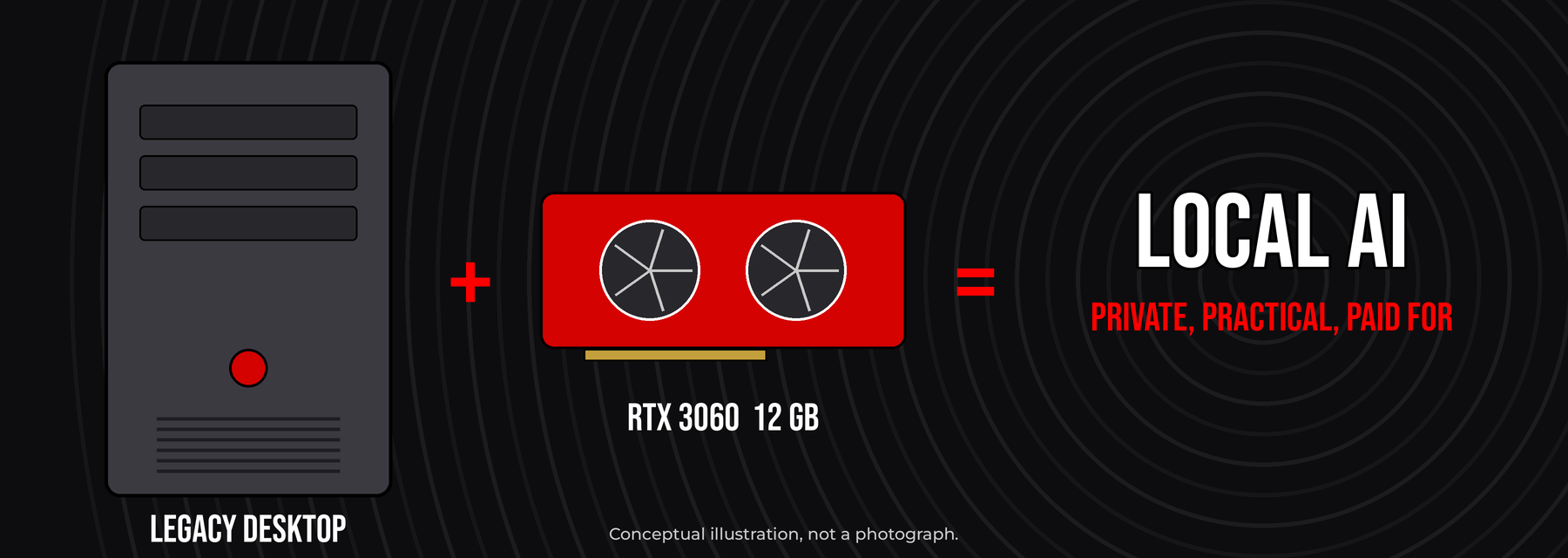
A conceptual sketch, not a photo: an old desktop plus a newer GPU, turned into a local AI box.
| |
WHO THIS IS FOR
Written for homelab operators, local LLM tinkerers, systems engineers, small-business tech teams and anybody technically curious who has been told that useful AI starts with a brand-new workstation.
|
Somewhere along the way, people decided that useful AI requires expensive GPUs, a mountain of memory and modern server hardware. Those things still matter for training, for serving lots of users at once and for heavy inference. They are not the price of admission for every local AI setup.
CyberTron is my test of that idea. It started as a roughly $150 AMD FX-era desktop. Over time I added a 12 GB NVIDIA RTX 3060, took the RAM to 32 GB of DDR3, moved to solid-state storage and put in a proper 650-watt power supply. The old motherboard and the FX-8300 processor stayed. Ubuntu, Ollama, llama.cpp, Open WebUI and some supporting pieces turned it into a working local inference box.
It also showed me exactly where the walls are: the old CPU’s instruction sets, memory bandwidth, the VRAM ceiling, context allocation, model load times and the speed penalty you pay when a model gets split between the CPU and the GPU. This paper walks through those tradeoffs and the results I recorded, and it labels which numbers are historical measurements, which are derived estimates and which are my engineering recommendations.
Useful private AI doesn’t always require a new workstation or an enterprise accelerator. It requires fitting the architecture and the model workload to the hardware you actually have.
The bottom line: aging hardware can deliver real local AI value when you pick the workloads and the models around what it can actually do.
1. The case for reusing old computers
|
Local AI decisions tend to get driven by the newest accelerators and the biggest models. But you don’t need a 70B-class model to classify documents, answer technical questions, search internal knowledge or run everyday automation. A smaller model that meets the quality bar and answers promptly can be a lot more useful than a much larger one that’s too slow to live with.
So the thing to optimize isn’t parameter count. It’s how useful the application is, within your limits on accuracy, latency, privacy, reliability and total cost. Four rules I keep coming back to:
- Reuse equipment that still handles the workload. Age alone doesn’t make hardware obsolete.
- Upgrade the bottlenecks you measured, not every part in the box.
- Fit model weights, context and buffers to the memory you actually have.
- Judge correctness and whether the job got done, not just tokens per second.
2. CyberTron: where it started and what I upgraded
|
2.1 The $150 starting point
The original CyberTron was an AMD FX-8300 processor on an ASUS AM3+ motherboard with 16 GB of DDR3, a mechanical hard drive and a GTX 1060 with 6 GB of video memory. That’s ordinary aging desktop gear, not a purpose-built inference server. I kept the base platform and upgraded only the parts that were holding it back. If you want the play-by-play, including the $25 RAM upgrade that turned into its own saga, it’s all in the Building CyberTron series on Roger’s Rabbit Hole.
2.2 Original versus upgraded
Table 1. Original versus upgraded configuration.
| Subsystem |
Original configuration |
Upgraded CyberTron |
| Motherboard |
ASUS M5A78L-M PLUS/USB3 |
Kept |
| Processor |
AMD FX-8300 |
Kept |
| Memory |
16 GB DDR3 |
32 GB DDR3 |
| GPU |
GTX 1060 6 GB |
Zotac RTX 3060 Twin Edge OC 12 GB |
| Primary storage |
1 TB mechanical HDD |
512 GB SATA SSD |
| Additional storage |
Original HDD |
Original HDD plus a later 1 TB SSD |
| Power supply |
500 W class |
be quiet! 650 W |
| Operating system |
Not recorded |
A current Ubuntu LTS release |
| Inference stack |
None yet |
Ollama, llama.cpp, Open WebUI |
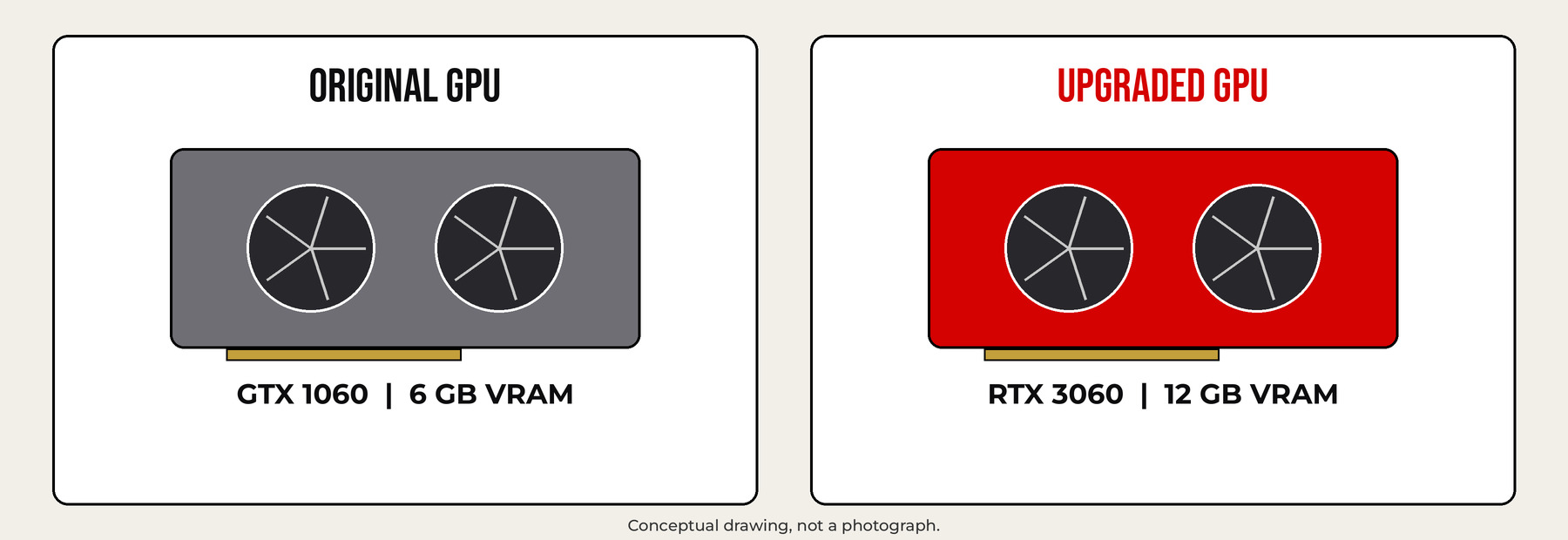
Figure 1. Original versus upgraded GPU. Illustrative drawing, not a photograph.
2.3 What it cost
Table 2. Initial purchase and upgrade cost, as recorded (historical).
| Component |
Recorded cost |
| Original desktop |
$150.00 |
| DDR3 upgrade |
$25.00 |
| RTX 3060 12 GB |
$285.04 |
| Patriot P210 512 GB SSD |
$69.99 |
| 650 W power supply |
$62.30 |
| Initial hardware total |
$592.33 |
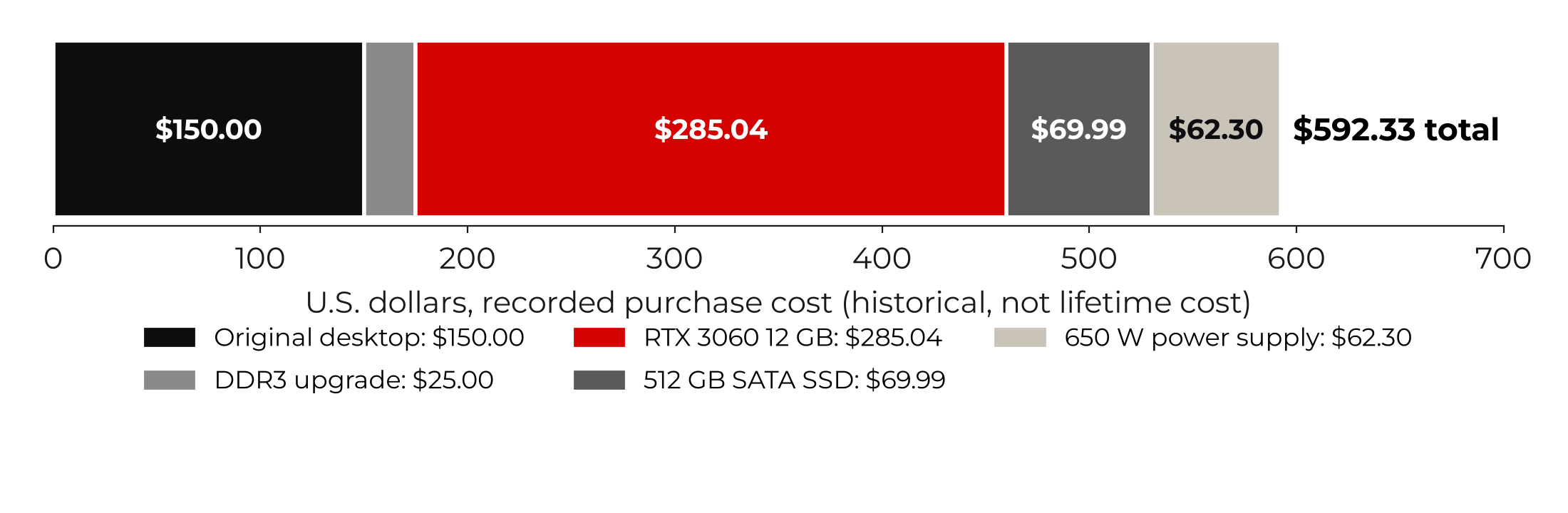
Figure 2. Where the documented $592.33 went (historical purchase records).
The GPU was about 48% of that total. To be clear about what that number is: it’s a historical hardware subtotal, not lifetime cost of ownership. It leaves out the later 1 TB SSD, electricity, maintenance, networking and my time. Used hardware prices today may be very different.
3. Where the bottlenecks are
|
3.1 FX-8300: compatibility before clock speed
The FX-8300 predates the vector instructions modern CPUs take for granted. It supports AVX and related older instruction sets, but not AVX2 or BMI2. Run an inference binary that was compiled to require instructions the chip doesn’t have, and it can die with an illegal instruction fault. The fix is to pick or compile a CPU backend the chip can actually run, and hand the right tensor work to a GPU that supports it.
The FX-8300 is still perfectly practical for Linux services, orchestration, request handling and some small jobs. It’s a lot less attractive when big chunks of the transformer have to run on the CPU against relatively slow DDR3.
3.2 Why 12 GB of VRAM mattered
Going from a GTX 1060 6 GB to an RTX 3060 12 GB doubled the nominal GPU memory. The RTX 3060 also supports CUDA compute capability 8.6 and brings Ampere-generation acceleration [1]. For local inference, extra VRAM can be worth more than a win on a gaming benchmark, because it keeps more of the model weights and runtime data on the card, where the fast work happens.
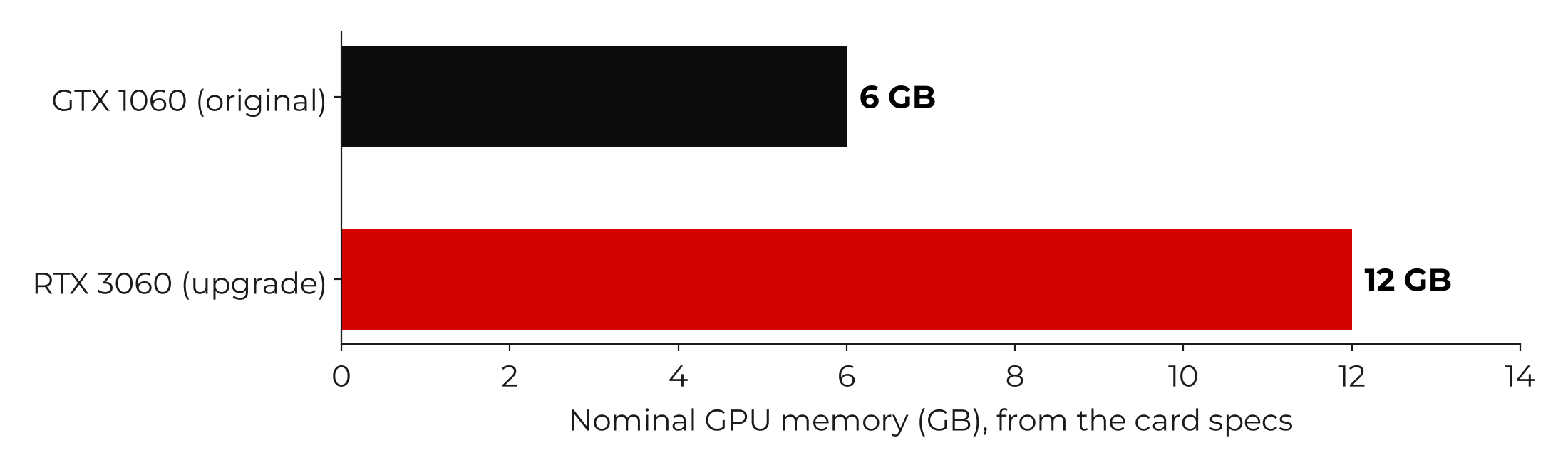
Figure 3. Nominal VRAM before and after the GPU upgrade.
3.3 PCIe: backward compatible, with a toll
The RTX 3060 is a newer PCIe card sitting in an older AM3+ board. PCIe links settle on a generation both ends support, subject to the motherboard’s firmware and power compatibility. On paper, one-way x16 throughput is about 8 GB/s for PCIe 2.0, 15.75 GB/s for PCIe 3.0 and 31.5 GB/s for PCIe 4.0 [6]. Those are theoretical figures, not measurements from CyberTron. For reference, ASUS lists this board’s x16 slot as PCIe 2.0 [7], and NVIDIA lists the RTX 3060 as a PCIe Gen 4 card [1].
The older interface matters less when the model weights and active inference data stay in VRAM. It shows up when there’s a lot of back-and-forth between the host and the GPU, or heavy CPU offloading.
3.4 DDR3: plenty of room, not much speed
Doubling the RAM to 32 GB gave more room for the operating system, inference processes, offloaded model pieces and file cache. It did not make the host memory as fast as a modern platform. When CPU layers keep reading model weights out of DDR3, memory bandwidth can cap the whole thing.
3.5 SSDs speed up loading, not GPU math
An SSD cuts model file access latency and can speed up service startup and model switching. Once the weights are sitting on the accelerator, raw SSD speed usually doesn’t decide how fast tokens come out. I later added a dedicated 1 TB SSD just for models and software.
4. Model memory engineering
|
A model leans on three tiers: GPU VRAM for accelerated compute, system RAM for the host and any model pieces running on the CPU, and storage for the model files. The fastest, most valuable tier is also the smallest. Funny how that works.
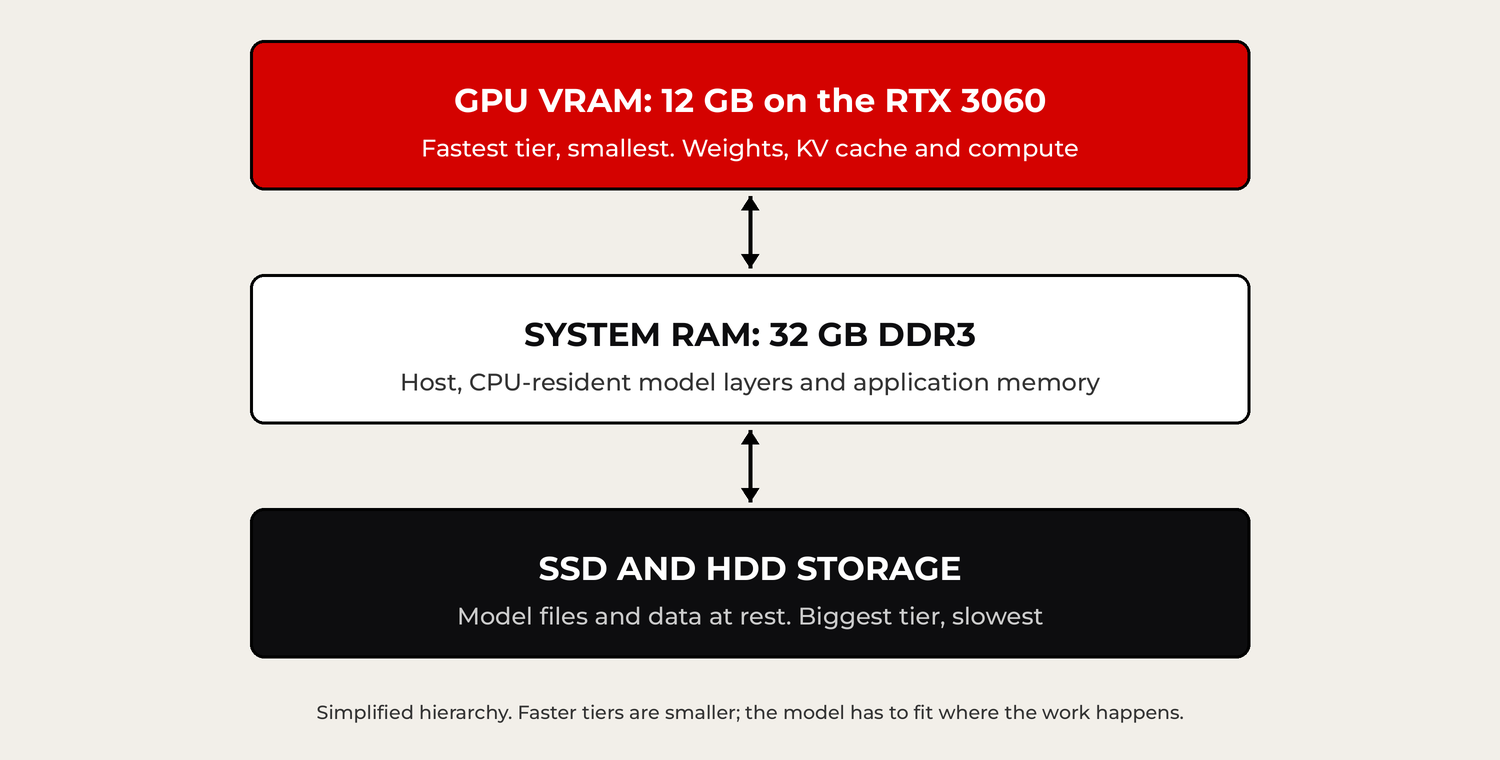
Figure 4. CyberTron’s simplified storage and inference memory hierarchy.
4.1 Estimating raw weight storage
For P stored parameters at an average of b bits per parameter, raw weight storage is roughly:
|
M_weights ≈ (P × b) ÷ 8 bytes
|
An 8-billion-parameter dense model at an ideal 4 bits per weight needs about 4.0 decimal GB, or 3.73 GiB. Real files add scales, metadata and format overhead, and actually running the model also takes KV cache and temporary allocations.
4.2 Quantization
Quantization lowers the precision of the stored weights so more model fits into a fixed amount of RAM or VRAM. It can also speed things up, but it can cost accuracy, depending on the method and the model [4]. As an idealized comparison, an 8B dense model takes about 32 GB at FP32, 16 GB at FP16, 8 GB at 8-bit and 4 GB at 4-bit, before format and runtime overhead.
Table 3. Idealized raw weight storage for a dense 8B model (derived estimate).
| Weight representation |
Idealized raw storage, dense 8B |
| FP32 |
32 GB |
| FP16 |
16 GB |
| 8-bit |
8 GB |
| 4-bit |
4 GB |
4.3 Context length and the KV cache
The KV cache holds the attention keys and values for tokens the model has already processed. For a conventional architecture, a simplified capacity equation is:
|
M_KV ≈ 2 × L × T × H_KV × D × B
|
L is layers, T is allocated tokens, H_KV is the number of KV heads, D is the per-head dimension and B is bytes per stored cache element. Exact behavior depends on the attention design, cache format, batching and runtime.
CyberTron has run with a documented Ollama context setting of 16,384 tokens. A model advertising a much bigger context window doesn’t mean that window fits efficiently in 12 GB of VRAM. Pick the context size from the real task length, memory use and latency, not from the spec sheet.
4.4 Worked example: budgeting VRAM
Take an illustrative 8B dense model at an effective 4.5 bits per weight. Estimated weight storage is 4.5 decimal GB. Add an arbitrary 2.0 GB runtime planning allowance and you’re at 6.5 GB. That leaves 5.5 GB on a 12 GB card, on paper. It is not a guarantee the model will load, because the allowance is a placeholder, not a model-specific KV calculation.
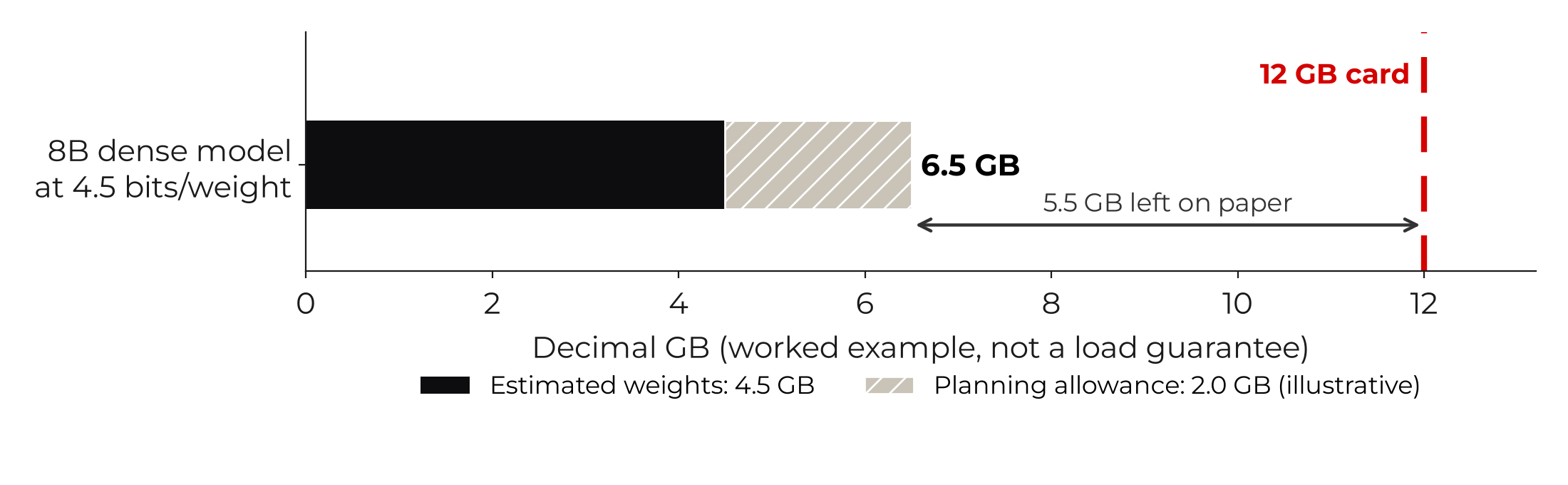
Figure 5. Static worked example from my model-memory calculator (illustrative).
A GPU by itself isn’t an AI service. CyberTron pairs a Linux host with inference backends, a web interface, voice interfaces, model selection and monitoring.
Table 4. The CyberTron software stack.
| Layer |
Technology |
Function |
| Operating system |
Ubuntu LTS |
Linux host and services |
| Containers |
Docker |
Isolated application deployment |
| Inference |
Ollama |
Model management and API |
| Inference |
llama.cpp |
GGUF, CUDA, quantization, offload tuning |
| Application |
Open WebUI |
Browser-based interaction |
| Voice |
Voice interface components |
Voice interaction |
| Supporting layer |
Routing and integrations |
Task and model selection, workflows |
| Monitoring |
Telemetry and evaluation |
Operational measurements |
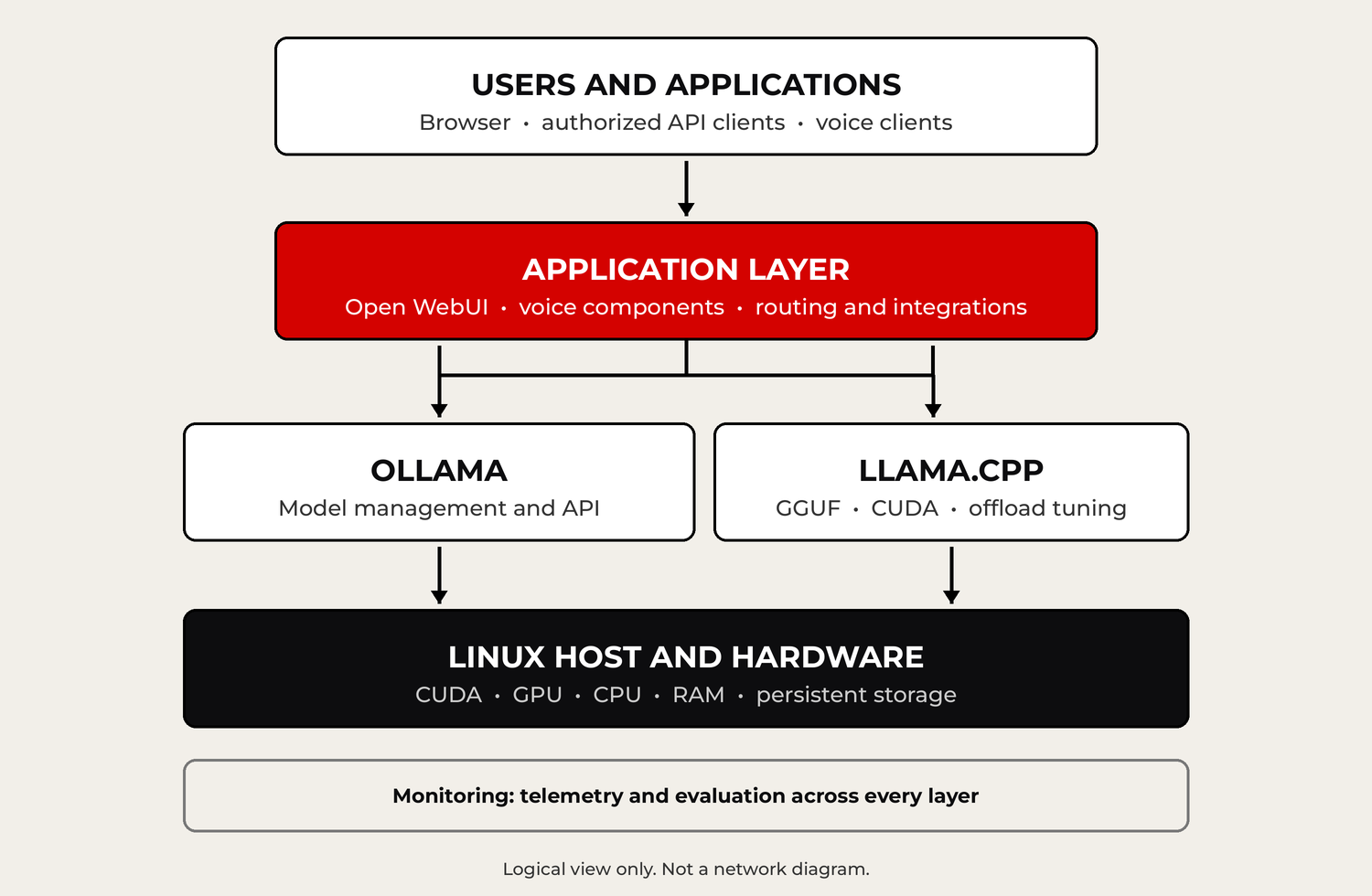
Figure 6. Logical application-to-inference architecture. Not a network diagram.
5.1 Ollama: model serving without the homework
Ollama handles model management and gives applications an API, so you don’t have to run the low-level inference plumbing yourself [5]. It doesn’t repeal the laws of memory, though. Oversized models may get partly offloaded or fail outright, depending on runtime policy and what resources are free.
5.2 llama.cpp: engineering for the hardware you have
llama.cpp gives you explicit control over CPU target compatibility, CUDA acceleration, quantization, context, KV cache formats and which model layers go where [2]. That makes it especially handy on old hosts whose processors can’t run every instruction in today’s prebuilt inference binaries.
Here’s an illustrative CUDA build configuration [3]. Check the flags against the exact source revision you’re building:
cmake -S . -B build-cuda \
  -DGGML_CUDA=ON \
  -DCMAKE_CUDA_ARCHITECTURES=86 \
  -DGGML_AVX=ON \
  -DGGML_AVX2=OFF \
  -DGGML_BMI2=OFF
The architecture value 86 targets the RTX 3060’s compute capability 8.6. This sample is not a verbatim record of every build option I used on CyberTron.
5.3 Open WebUI and the application layer
Open WebUI provides the browser layer where people chat with models and use whatever features are configured. Because it’s a separate layer, I can swap or tune the model underneath without rebuilding everything users see. Authentication, networking, user separation and integration permissions are still their own jobs, and each needs its own attention.
6. What CyberTron’s model experiments recorded
|
The records below are historical observations. I didn’t rerun or normalize them for this paper. Different models, prompts, runtimes, context sizes, quantization and processing settings all limit how directly you can compare them.
Table 5. Historical CyberTron observations. Not a controlled comparison.
| Workload |
Recorded observation |
| 8B model |
Full GPU placement at selected 4K, 8K and 16K contexts |
| 14B model |
About 9.6 GB of VRAM; full GPU placement in tested contexts |
| 7B function-calling chat model |
About 59.6 to 63.6 generated tokens per second |
| 9B model, thinking off |
About 66.6 generated tokens per second |
| 35B-total, 3B-active MoE model, a community build based on Qwen3.6-35B-A3B, 4-bit (Q4_K_M) |
About 7.09 tokens per second with 16 layers offloaded to the GPU |
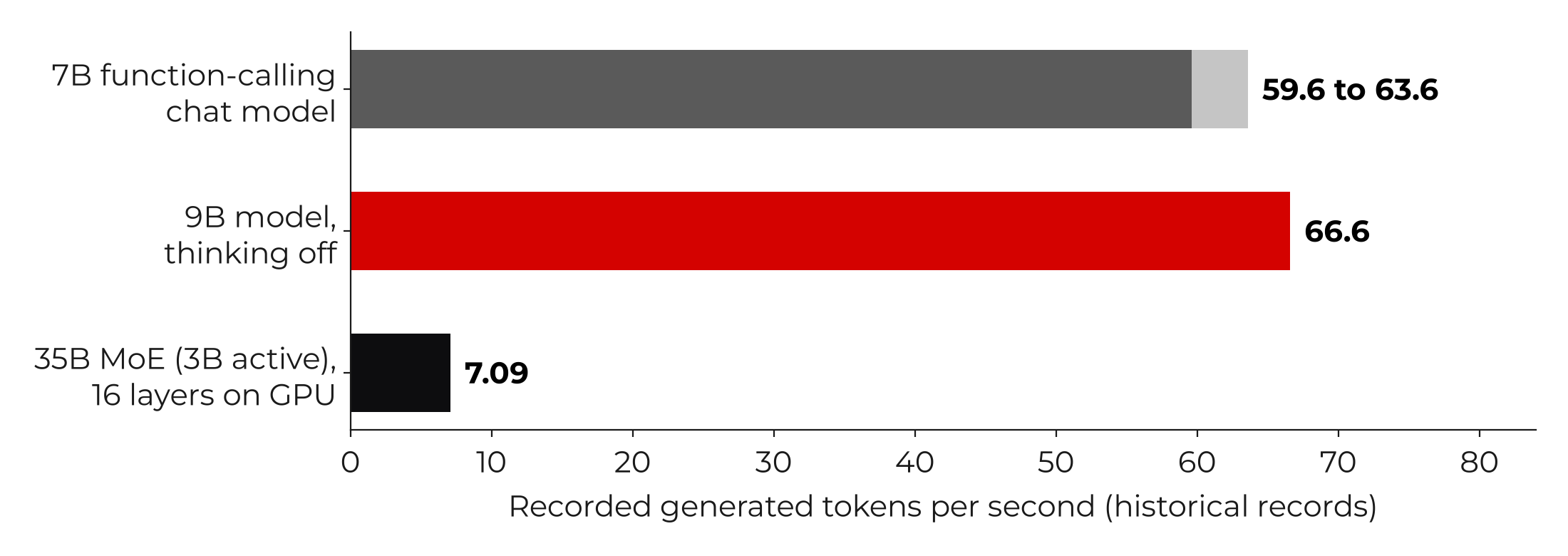
Figure 7. Selected historical generation speeds. The 35B is a community build based on Qwen3.6-35B-A3B, not an official Qwen release. Not a controlled comparison.
6.1 The bigger MoE model
I also tested a much bigger one: a 35B-total, 3B-active mixture-of-experts model, a community build based on Qwen3.6-35B-A3B [8], run at 4-bit (Q4_K_M). To be clear, it is not an official Qwen release. I pulled it from Hugging Face in October 2026, and it now lives in my model rack. The GGUF file is roughly 21.7 billion bytes. That’s bigger than 12 GB of VRAM before you even count runtime buffers, so the model ran split across the CPU and the GPU.
Table 6. Recorded throughput by GPU offload, one test series (historical).
| Layers offloaded to GPU |
Recorded speed |
| 8 |
4.35 tokens per second |
| 12 |
6.15 tokens per second |
| 16 |
7.09 tokens per second |
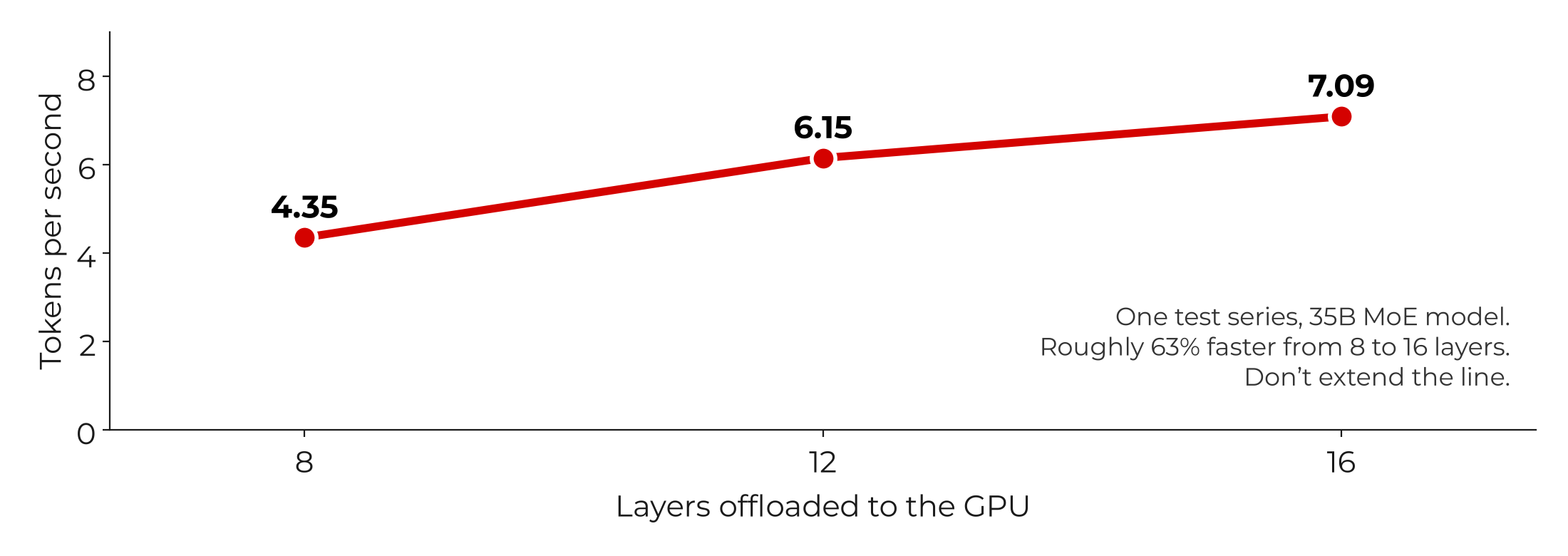
Figure 8. Recorded throughput for the 35B MoE community build as GPU offload increased, in one mixed CPU and GPU test series.
Going from 8 to 16 layers on the GPU bought roughly 63% more throughput in this series. Don’t draw a straight line from that to other settings or architectures.
If you read my last white paper, you saw different numbers for this same 35B model on this same card: 5.56 tokens per second on the first standardized benchmark and 11.75 at best after tuning. Those came from separate runs. That’s exactly why I keep saying these records aren’t a controlled comparison.
| |
FROM MY BENCH
IT RAN. THAT’S NOT THE SAME AS USABLE.
The 35B model loaded and answered on a 12 GB card, which counts as a win on paper. At 7.09 tokens per second, the best setting in that offload series, a 300-token answer takes about 42 seconds of generation alone. Even at the 11.75 I got after tuning, it’s about 26 seconds. The 9B model with thinking off was recorded at about 66.6 tokens per second, which turns the same answer into roughly 4.5 seconds. Those times are my math on the recorded speeds, not a stopwatch, and they leave out prompt processing and load time.
|
6.2 Mixture of experts doesn’t shrink the memory bill
An MoE model sends each token through a few selected experts instead of firing every expert every time. That can cut active computation compared with a dense model of similar size, but the unused experts still take up storage and still need a place in memory or a way to be reached. A model with roughly 35B total parameters and 3B active does not have the memory footprint of a simple 3B dense model.
6.3 Why CPU offloading can be slow
A conceptual way to break down per-token latency:
|
t_token ≈ t_GPU + t_CPU + t_transfer + t_other
|
Runtimes can overlap some of that work, so this isn’t an exact profiling equation. It does explain why big pieces of a model running on an older processor and DDR3 can dominate the critical path, GPU or no GPU.
6.4 Tokens per second versus what it feels like
Table 7. Generation speed and wait time (derived).
| Generation throughput |
Time to produce 300 tokens* |
| 5 tokens per second |
60 seconds |
| 10 tokens per second |
30 seconds |
| 30 tokens per second |
10 seconds |
| 60 tokens per second |
5 seconds |
*Excludes prompt processing, time to first token, model loading, tools and network overhead.
How fast is fast enough depends on the job. Five tokens per second might be fine for a batch job and maddening in a chat window. Quality, tool success and total response time matter as much as raw generation speed.
7.1 Fit beats maximum size
On a constrained GPU, a quantized model that fits alongside its cache and buffers often gives a better interactive experience than a much larger model split between the GPU and a weak CPU. It still has to prove itself on the task you actually need done.
7.2 Specialized model racks
Keeping separate models for general chat, coding, embeddings, structured output and multimodal work can make the system more useful without asking one giant model to do everything. I made the longer case for that in my last white paper, Bigger Isn’t Always Smarter. On a single 12 GB GPU, though, a variety of models doesn’t mean they’re all loaded at once. Queueing, running models one after another, preloading and unloading are the controls that matter.
7.3 Models on disk aren’t models in memory
Storing a pile of models on a big SSD isn’t the same as keeping them ready. A system can hold lots of model files and still only have room for one or a few resident models. Faster switching competes with VRAM headroom, context capacity and concurrency.
7.4 Headroom is part of capacity
A model that loads fine on a short test prompt hasn’t proved it will survive realistic context sizes. Acceptance testing should include representative prompt lengths, multiple requests, peak memory use, failures and controlled tool operations.
8. Reliability and operating economics
|
8.1 Electricity and the real cost of ownership
The RTX 3060’s reference graphics card power is about 170 W [1]. That’s the card, not the whole system. A 650 W power supply rating tells you what it can deliver, not what it draws all day. For a box that runs around the clock, annual energy cost is:
|
(average wall watts ÷ 1,000) × 8,760 hours × electricity rate per kWh
|
At an illustrative 120 W average wall draw and $0.15 per kWh, running 24/7 uses 1,051.2 kWh and costs about $157.68 a year. That’s an assumed scenario, not a measurement of CyberTron’s power use.
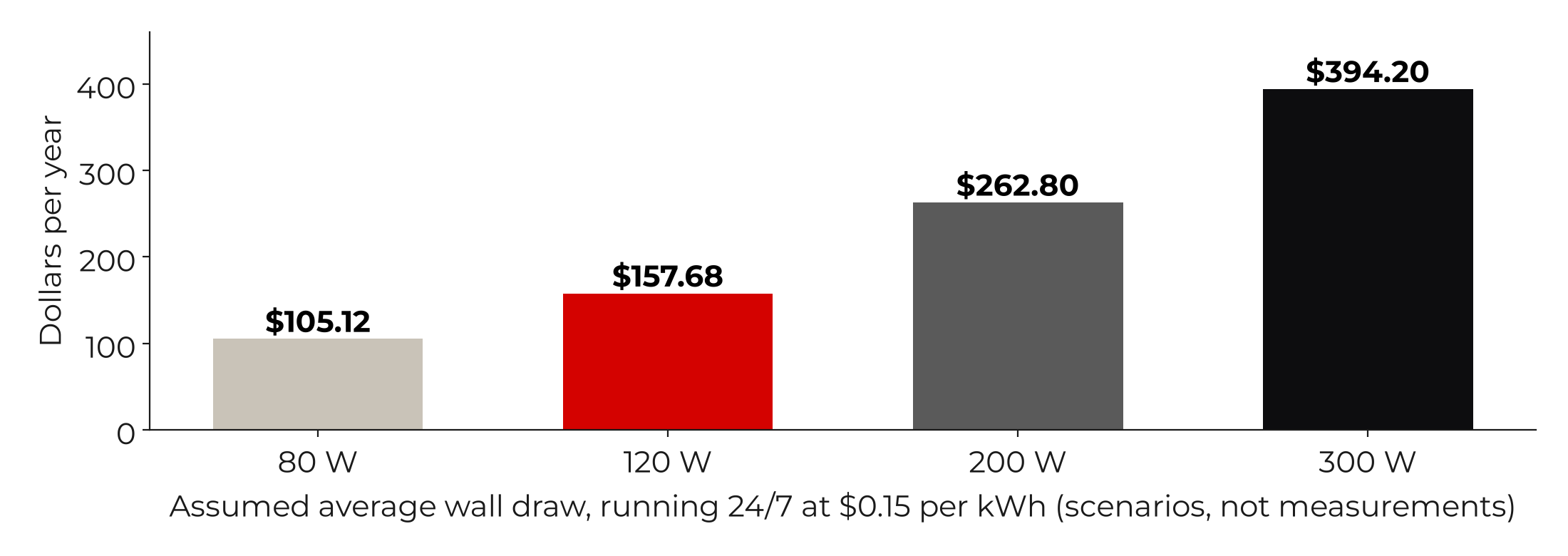
Figure 9. Annual cost scenarios at 24 hours a day and $0.15 per kWh. Not CyberTron measurements.
8.2 Break-even and lifecycle
Total cost of ownership includes hardware, energy, maintenance, outage exposure and engineering time. Old platforms may be less efficient per token than newer ones. Eventually processor speed, RAM limits, interconnect bandwidth, supportability and failure risk add up to the point where replacing the platform makes more sense than another upgrade.
8.3 Heat and hardware reliability
Long inference runs put sustained thermal and electrical load on a machine. Watch temperatures, fans, connectors, power supply quality, unexpected resets and storage health. If the service makes you money, recovery plans and redundancy may be worth more than whatever you saved buying old hardware.
8.4 Security is something you build
Running AI locally gives you more control over where your data gets processed. It does not make the service secure on its own. Use authenticated access, least privilege, encrypted transport where it applies, limited admin exposure, updates, logging and explicit authorization checks on anything that lets a model run tools.
- Inventory the CPU and its instruction flags, the motherboard, PCIe, RAM, GPU, power supply, storage, firmware and cooling.
- Define the accuracy and latency the workload needs, then run a baseline with a small model the hardware can handle.
- Upgrade the bottleneck you measured instead of swapping several parts without evidence.
- Build or pick inference binaries that match the actual CPU and GPU architectures.
- Benchmark prompt processing, time to first token, generated tokens per second, peak memory and error rates under controlled conditions.
- Test real retrieval, code, tool integration and document workflows, not just synthetic prompts.
- Record known-good versions, flags, models, configuration and rollback information so the result can be reproduced.
Table 8. What to record for every benchmark.
| Benchmark field |
Record |
| Model identity |
Exact name, revision, checksum |
| Format and quantization |
GGUF or other, exact quant |
| Runtime |
Ollama or llama.cpp version or commit |
| Execution |
GPU layers and backend |
| Context |
Configured and actual tokens |
| Latency |
Time to first token and prompt processing |
| Generation |
Tokens emitted and tokens per second |
| Resources |
Peak VRAM and host RAM |
| Quality |
Task success, errors, reproducibility |
10. Read-only diagnostic commands
|
These assume a Linux AI host and Bash. Run them as a standard user from any directory, with the tools installed. They only look. They don’t change any service.
CPU and instruction support
lscpu
Memory capacity
free -h
GPU state and memory
nvidia-smi
PCIe device inventory
lspci | grep -Ei 'vga|3d|nvidia'
Persistent storage
lsblk -o NAME,SIZE,TYPE,FSTYPE,MOUNTPOINTS
Ollama active models
ollama ps
11. What it’s good for, and what it isn’t
|
Table 9. Appropriate and inappropriate workloads for a CyberTron-class box.
| Workload |
Fit |
Why |
| Single-user chat |
High |
Quantized models that fit can respond promptly |
| Knowledge retrieval |
High |
Embeddings plus retrieval plus a small generator |
| Document analysis |
Moderate to high |
Context and document length matter |
| Coding assistance |
Moderate to high |
Model quality and tests matter |
| Multimodal models |
Moderate |
Extra vision and memory demands |
| Very large offloaded models |
Limited |
CPU and DDR3 bottlenecks |
| High-concurrency serving |
Limited |
One 12 GB GPU limits what can stay loaded |
| Large-model fine-tuning |
Poor |
Training memory and compute requirements |
| Frontier-model training |
Not practical |
Orders of magnitude short on resources |
12. Ten operating recommendations
|
- Start with a defined workload, not a model leaderboard.
- Choose VRAM capacity for the models and context you actually need.
- Aim for full GPU residency for interactive models where you can.
- Quantize on purpose, and verify accuracy at the task level.
- Treat advertised context length as a ceiling, not a free default.
- Use CPU offload as a latency tradeoff you accept with your eyes open.
- Keep specialized models rather than one universal giant.
- Record benchmark inputs and outcomes so they can be reproduced.
- Count electricity and maintenance alongside the purchase price.
- Set an upgrade ceiling, and replace the platform once its architecture is the bottleneck.
13. The honest limitations
|
CyberTron is one physical machine, not a controlled survey of many systems. Its configuration changed over time, and the historical speed records weren’t collected under identical model, context or runtime conditions. For this paper I didn’t rerun the benchmarks or independently check the system’s current state. The $592.33 is not lifetime cost of ownership, and I have no controlled comparison against new hardware and no power meter data. And a model running, at any number of tokens per second, is not the same thing as a business or technical task getting done.
One more: the CyberTron costs, configurations and speeds in here come from my project records. I haven’t yet checked every one against the original logs, so treat them as a builder’s notes, not as scientifically reproducible results, until I do.
CyberTron started as a $150 legacy desktop and became a useful local inference box by fixing the constraints that were actually in the way. A 12 GB RTX 3060 gave it enough accelerator for capable quantized models. More RAM and SSD storage gave the host room to breathe and made day-to-day operation practical. Inference builds the FX-8300 could actually run kept the old platform in the game.
The big-model offload test showed the other side of the ledger: a workload can technically run and still be too slow for the experience you want. Reusing hardware works when you weigh model choice, memory placement, latency, accuracy, reliability and cost together.
Aging hardware can’t do everything. But a computer’s useful life is decided by whether it can handle a defined workload at an acceptable cost, not by the date it was built.
[1] NVIDIA, “GeForce RTX 3060 Family” specifications (graphics card power, CUDA capability, PCI Express Gen 4). https://www.nvidia.com/en-us/geforce/graphics-cards/30-series/rtx-3060-3060ti/
[2] llama.cpp project. https://github.com/ggml-org/llama.cpp
[3] llama.cpp build documentation. https://github.com/ggml-org/llama.cpp/blob/master/docs/build.md
[4] llama.cpp quantization documentation. https://github.com/ggml-org/llama.cpp/blob/master/tools/quantize/README.md
[5] Ollama documentation. https://docs.ollama.com/
[6] PCI Express link throughput by generation, PCI-SIG figures as summarized in the PCI Express reference article. https://en.wikipedia.org/wiki/PCI_Express
[7] ASUS, M5A78L-M PLUS/USB3 user manual, specifications summary (expansion slots). https://dlcdnets.asus.com/pub/ASUS/mb/SocketAM3+/M5A78L-M_PLUS_USB3/E11584_M5A78L-M_PLUS_USB3_UM_WEB_only.pdf
[8] Qwen, Qwen3.6-35B-A3B official base model, Hugging Face. The 35B model in section 6.1 is a community build based on this model, not an official Qwen release. https://huggingface.co/Qwen/Qwen3.6-35B-A3B
|
How to read the numbers: every CyberTron number in this paper falls into one of three buckets. Historical: costs, settings and speeds from my project records, not rerun for this paper. Derived: math done on those records or on published specs, like the VRAM budget, the 48% GPU share and the wait times. Illustrative: assumed scenarios, like the electricity costs, which are not measurements. Hardware specs (VRAM, card power, compute capability, PCIe rates) come from the manufacturers and the PCIe standard, not from my bench. The drawings are conceptual schematics, not photographs, and the interactive calculator from my working notes appears here as a static example.
|
Related reading on Roger’s Rabbit Hole: Bigger Isn’t Always Smarter, my white paper on why a model rack can beat one giant AI model, and the Building CyberTron series, which covers each upgrade in this paper as it happened.
ABOUT THE AUTHOR
|
|
Roggie D has been messing with computers since the early 1980s and working in IT since the mid-1990s, from network engineering to the CEO’s chair. These days he’s retired, which mostly means he gets to pick which problems are worth solving. He writes Roger’s Rabbit Hole, where CyberTron, his budget local AI build, keeps sending him down new ones.
More from the Rabbit Hole at rogersrabbithole.com.
|